
DayZ Cheats PC: Features, Requirements, and Compatibility
Compare DayZ PC cheat features, Windows requirements, ESP options, aimbot settings, and available access plans before choosing a setup.
Choosing DayZ cheats for PC starts with compatibility. Before comparing menus or pricing, check whether your computer meets the listed requirements and whether the available features match how you play.
The current product setup is designed for Windows 10 and Windows 11 PCs with Intel or AMD processors. It also lists TPM, HVCI, Core Isolation, and Secure Boot requirements. Cloud DMA is listed as required for full functionality.
What features are available?
The product page groups the main options into several sections.
Player ESP
Player ESP can display information about nearby players. Available options include player boxes, filled boxes, skeletons, head dots, health bars, names, distance, inventory, item in hands, traces, and maximum distance controls.
The menu also includes options for friends and different visual styles. That gives you more control over how much information appears on screen.
Aimbot settings
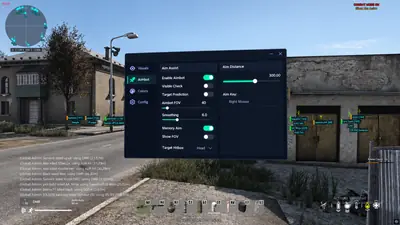
The aimbot section includes customizable field of view, aim distance, player, infected and animal filters, bone selection, FOV styles, and target lines.
Bone options include nearest, head, neck, and pelvis. These settings matter because different players prefer different levels of control.
Item ESP
Item ESP is useful for players who want more information while searching buildings and loot areas. The menu lists item quality controls, quality display styles, battle mode, and an option to show information only while hovering.
The hover option can help reduce visual clutter when you are checking a specific item.
World ESP
World ESP covers map objects rather than players. The listed options include animal ESP, vehicle ESP, and helicrash markers.
These settings are more situational than player ESP. Some players may prefer to enable them only when planning a specific route.
Miscellaneous options
The miscellaneous section includes No Clip, Always Day, Local position, Thirdperson unlock, No grass, and Crosshair.
Not every option will suit every setup. It is usually better to start with the features you actually need and add others gradually.
What does the PC need?
The listed requirements are:
- Windows 10 or Windows 11
- Intel or AMD processor
- TPM enabled
- HVCI enabled
- Core Isolation enabled
- Secure Boot enabled
- Cloud DMA for full functionality
Check these settings before choosing a plan. Some are controlled through Windows Security, while others may require a firmware or BIOS change.
Is this for console?
The listed requirements describe a Windows PC product. It is not presented as a console solution.
If you play DayZ on console, the PC requirements and feature list do not apply to your setup.
Which features should you compare first?
Start with the way you normally play:
- For player awareness, review the Player ESP section.
- For aiming controls, review FOV, distance, filters, and bone selection.
- For looting, review Item ESP and item quality settings.
- For route planning, review vehicle and helicrash options.
- For a cleaner interface, review maximum distance and hover-only controls.
The best comparison is not the longest feature list. It is the one that clearly explains what each option does and whether your PC meets the requirements.
Check the DayZ cheats product page at /products/dayz-cheats/ for the current feature list and access plans. Review the requirements page at /faq/ before buying, especially if TPM, HVCI, Core Isolation, or Secure Boot are disabled on your system.